Not techy? You can still do it with AI
Tell us a job you do every week.We'll map it in plain steps, then teach you the AI parts.
- 1Tell us a job
- 2See it mapped
- 3Learn it with AI
Tell us a job you do every week.We'll map it in plain steps, then teach you the AI parts.
HomeCourses
Pick a tool, or start from your map. Every course is hands-on: you do it in the real tool, and keep what you make.
HomeFor teams
We map how your team works, then teach everyone the steps AI can help with, in the tools you already use.
HomeFree resources
A quick check of where AI could help your week, plus hand-picked free courses, guides and cheat sheets from the people who make the tools.
HomeStories
Examples of how someone could map a job they do every week, learn the AI steps, and make it their own.
HomeAbout
doingit.today helps people who don't call themselves techy get real jobs done with AI, one hands-on lesson at a time.
Two things. We map how you work, in a few plain steps. Then we teach you to do the fiddly ones with AI, yourself.
1We map your work
Describe a job you do every week, in your own words. Type it or say it. No forms, no jargon.
2We map your work
We turn it into a short map of steps, and mark the ones AI can help with. Nothing changes until you choose.
steps
AI can help with
3You learn to do it
Each step AI can help with comes with a short, hands-on course. You do it yourself, in the real tool, and keep what you make.
Short, hands-on courses for the tools behind your map.

Learn alongside other people in live, friendly sessions, then keep going online.
First session
A friendly group that will meet every two weeks to learn tech and AI together, starting on Thursday 12 November. Each session takes one topic, in plain English, with time for your own questions.
Choose the tool you want to learn. Example courses
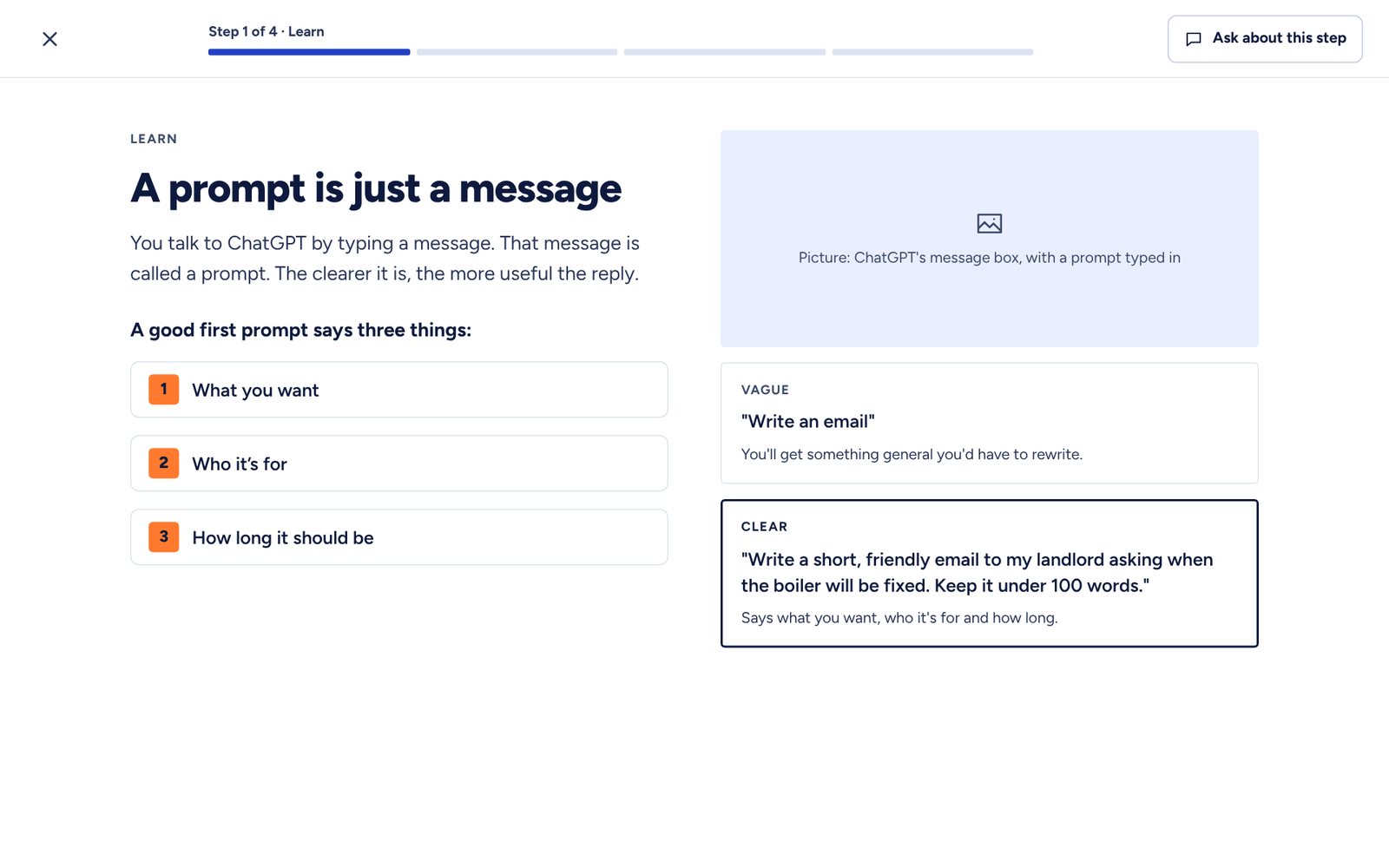
Every lesson is a few short steps. Learn the idea, check you've got it, then do it for real in the tool.
from our ChatGPT course
Tell us one job you do every week. We'll map it, and point you to the right course.
The same two halves as for one person: we map the work, then your team learns to do it.
A short workshop where people tell us, in their own words, how a few key jobs get done.
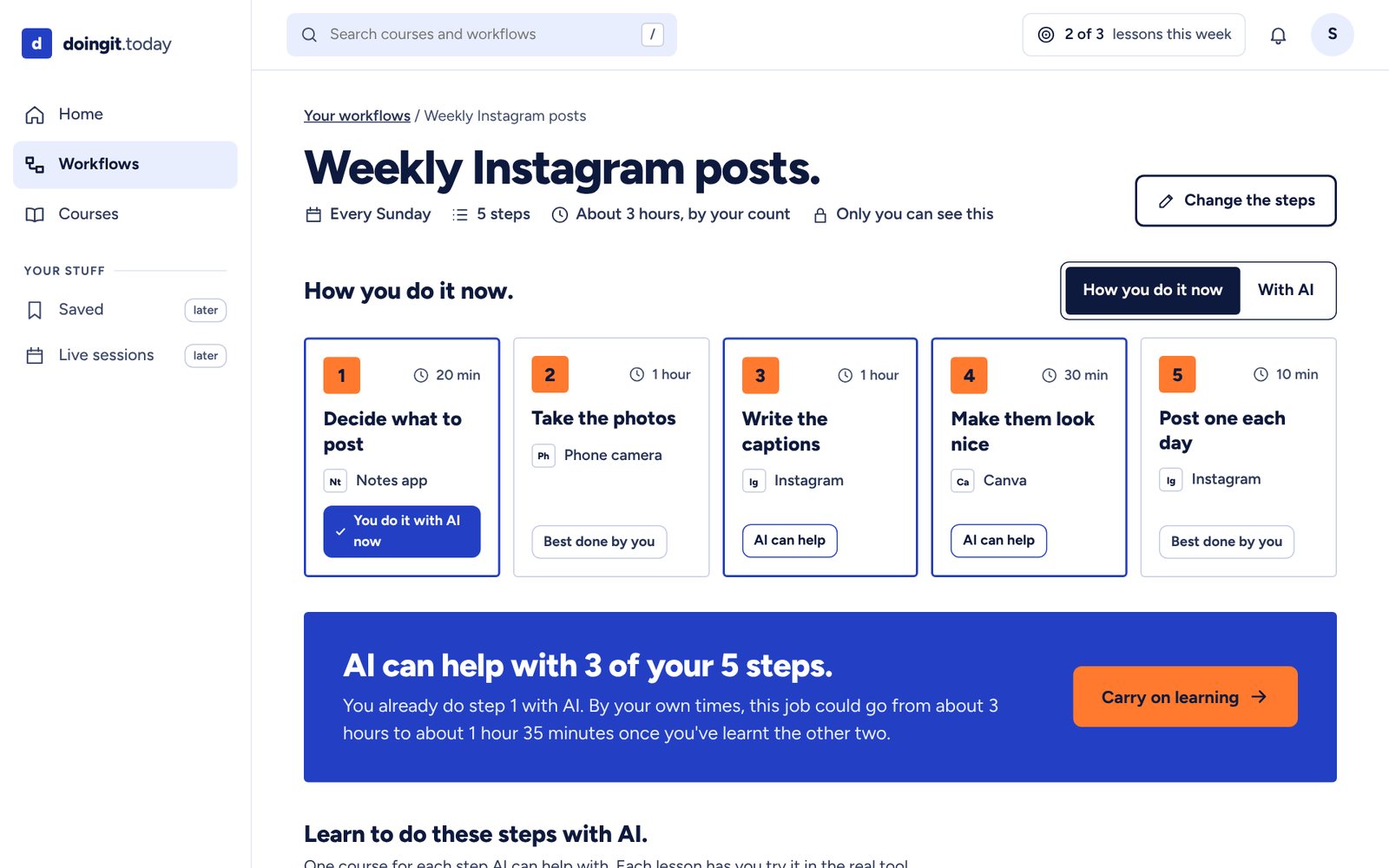
Each job becomes a short map of plain steps, with the ones AI can help with marked.
Hands-on courses for the marked steps, plus live sessions to bring questions to.
Your team sees each job as a few plain steps, with the ones AI can help with marked, and a course for each.
an example job
A short call to hear how your team works, and where AI could help.
Book a callNo. Courses start from zero, in plain English. If someone can send an email, they can start.
No. We start with the tools your team already uses, and only suggest a new one when it clearly helps.
It stays yours. We only use it to map your team's jobs and run your course. We never sell it, and we'll delete it whenever you ask. Read the short version.
It depends on the size of your team and how many jobs we map together. We'll give you a clear price on the call, before you agree to anything.
Free check
Pick the jobs you do. We'll show which parts AI could help with, and where to learn them.
Pick one or more jobs, then press Show me. Your answer shows here.
Hand-picked, free, and mostly from the people who make the tools. Each link opens the original site in a new tab.
Free courseFree
A short course on working well with AI: what to ask, and how to check what you get back.
From Anthropic Academy
Open on anthropic.skilljar.com (opens in a new tab)Free courseFree
Get set up with Claude and try it on everyday tasks.
From Anthropic Academy
Open on anthropic.skilljar.com (opens in a new tab)Free courseFree
A beginners' course on what AI is, and what it can and can't do.
From the University of Helsinki and MinnaLearn
Open on elementsofai.com (opens in a new tab)Free courseFree
A short course from Google on what generative AI is and how it works.
From Google Skills
Open on cloudskillsboost.google (opens in a new tab)Videos and live sessionsFree
Free videos, guides and live sessions on using ChatGPT.
From OpenAI
Open on academy.openai.com (opens in a new tab)GuideFree
Example prompts for Gmail, Docs and Sheets, sorted by the kind of work you do.
From Google Workspace
Open on workspace.google.com (opens in a new tab)GuideFree
Claude's own help page: signing up, your first chat, and what to try.
From the Claude Help Center
Open on support.claude.com (opens in a new tab)GuideFree
Step-by-step help for notes, lists and pages in Notion.
From Notion
Open on notion.com (opens in a new tab)Cheat sheetFree
The basics on one page: making, sharing and tidying a sheet.
From the Google Workspace Learning Center
Open on support.google.com (opens in a new tab)Safety guideFree
The UK's National Cyber Security Centre on what not to share with AI chatbots.
From the NCSC
Open on ncsc.gov.uk (opens in a new tab)We don't run these sites. We check the links work, and swap any that stop being free.
A new cheat sheet, guide or template in your inbox. Leave any time.
This page shows the layout only. The stories are examples, not real people. Real stories go here after the first Tech Guild sessions, shared with each person's permission.
Described the order in their own words, saw it as four steps, then learnt to let AI draft the list from last week's sales.
A hairdresser · Booking new clients
Learnt to draft friendly replies and keep one bookings sheet.
A community group lead · The newsletter
Plans each issue with Claude, then makes the header in Canva.
A shop owner · Monday sales report
Tidies the sales in Sheets and writes the email with Gemini.
A tutor · Planning lessons
Drafts plans with Claude and keeps them in Notion.
A volunteer · Event posters
Writes the brief with ChatGPT, then makes it in Canva.
A freelancer · Chasing invoices
Keeps a simple sheet and drafts reminders with ChatGPT.
Lots of people hear about AI every day, but nobody shows them what it could do in their own week. So we start from the work you already do, and teach you to do the fiddly parts yourself.
I'm Jamil, and I build apps and websites for small businesses. I keep meeting clever, capable people who feel AI isn't for them, because nobody has shown them where it fits in their own work. doingit.today is my answer: start from a job you really do, and learn the AI parts one small step at a time.
Know a tool well? Help other people learn it, in friendly live sessions.
Become a mentorQuestions, ideas or a story to share? Email jamil@doingit.today.
Already have an account? Log in
or
Thanks for trying. Sign-ups aren't open yet, so nothing you typed was saved or sent.
See how we handle your information on our privacy page.
New to doingit.today? Sign up
or
Accounts aren't open yet, so there's nothing to log in to. Nothing you typed was saved or sent.
See how we handle your information on our privacy page.
Nearly there. Your email app should now open with your request written out. Press Send there, and we'll reply to find a time.
No email app opened? Copy your request, then email it to jamil@doingit.today.
doingit.today is run by DoingIt Limited, a company registered in England and Wales (company number 17108880). Our registered office is 1st Floor, 57 Farringdon Road, London EC1M 3JB. We are responsible for any information this website handles.
doingit.today isn't open for sign-ups yet, so there are no accounts. The sign-up and log-in forms and the free check work only in your browser: the forms clear what you type, and nothing you type in them leaves your device.
The book-a-call form and the newsletter box don't send anything themselves. They write your request into an email in your own email app, addressed to us, and nothing reaches us unless you press Send there. We then treat it like any other email you send us.
We don't use cookies, analytics or advertising trackers. Our fonts and photos come from our own website, so loading a page doesn't tell any other company that you visited.
Like every website, ours runs on a hosting provider's servers. When you load a page, those servers briefly record technical details such as your IP address, your browser and the page you asked for. This keeps the site working and safe, and the provider deletes these records after a short time.
If you write to jamil@doingit.today, we use your email address and message only to reply to you. We delete them when we no longer need them, or sooner if you ask.
Some pages link to free courses and photos on other websites. When you follow a link, that website's own privacy policy applies.
You can ask what we hold about you, ask us to correct it, or ask us to delete it. Email jamil@doingit.today and we'll reply within a month.
If you're unhappy with how we've handled your information, please tell us first. You can also complain to the Information Commissioner's Office at ico.org.uk.
Before doingit.today opens sign-ups, we'll update this page to say exactly what we keep and why. We won't collect anything new until it does.
Last updated 4 November 2026.


